ZYPLC Blog
DeltaV Analog Input Faults: Trace the Loop Before Replacing the Card
Separate transmitter, wiring, termination, channel and configuration causes in a DeltaV analog input fault before selecting a replacement module.

A drifting process value is a familiar trigger for a spare-card request. Yet an analog input that reads low, noisy or frozen may be reporting a transmitter problem, a wiring issue, a termination fault, an incorrect channel configuration or an actual input module defect. Replacing the card before separating those boundaries can consume outage time and leave the original cause untouched. In a DeltaV S-series system, begin with the channel identity and the approved loop documentation, then compare the field measurement, termination and controller-side value in a controlled sequence.
Identify the complete channel path
Record the controller and I/O node, carrier or slot, exact module code, channel number, terminal or field termination assembly, transmitter tag and loop drawing revision. Confirm whether the signal is configured as current, voltage, thermocouple or another supported input type; do not infer configuration from the card label. Retrieve the instrument range, engineering units, scaling, alarm limits, damping and any channel-specific diagnostic settings from the approved project. A correct electrical signal can still appear wrong if the range, scaling or channel assignment does not match the field device.
Save the first alarm, module diagnostics, process trend and recent maintenance history before acknowledging or changing anything. Note whether one channel or several changed together and whether the problem followed a transmitter replacement, marshalling work, cabinet maintenance, power disturbance or configuration download. Multiple adjacent failures may suggest a shared terminal, supply or common-return issue, though the drawings and measurements must confirm it.
Compare field, termination and controller evidence
Use the site-approved instrument and procedure to verify the field signal at the designated test point. Follow hazardous-area, permit and electrical safety requirements. Compare the measured current or voltage with the transmitter’s local indication and the configured process value at the controller. Make sure measurements are taken at points that allow a meaningful comparison; opening a loop or inserting a meter incorrectly can alter the signal and create a process upset. Do not lift wires or inject a signal into a running process unless the procedure explicitly authorizes it.
Work outward from the field device through junction box, cable, marshalling or termination hardware to the I/O channel. Inspect terminal tightness, corrosion, shield termination, polarity and cable damage within the approved boundary. Confirm loop power and common reference where relevant. If the field reading is correct but the controller value is not, compare at the termination and module input points using the documented method. If the value becomes incorrect before reaching the cabinet, focus on the instrument and field wiring rather than replacing the card.
Distinguish channel electronics from application behavior
Review channel quality, open-circuit or underrange/overrange diagnostics, module health and adjacent channel state. Compare only like-for-like channels with known configuration. Check whether the application uses filtering, substitution values, bad-quality handling or interlocks that affect what operators see. A displayed value can be held, calculated, clamped or marked bad in logic even when the raw input is changing. Preserve the raw diagnostics and the configured path so the controls engineer can trace how the operator graphic obtains its number.
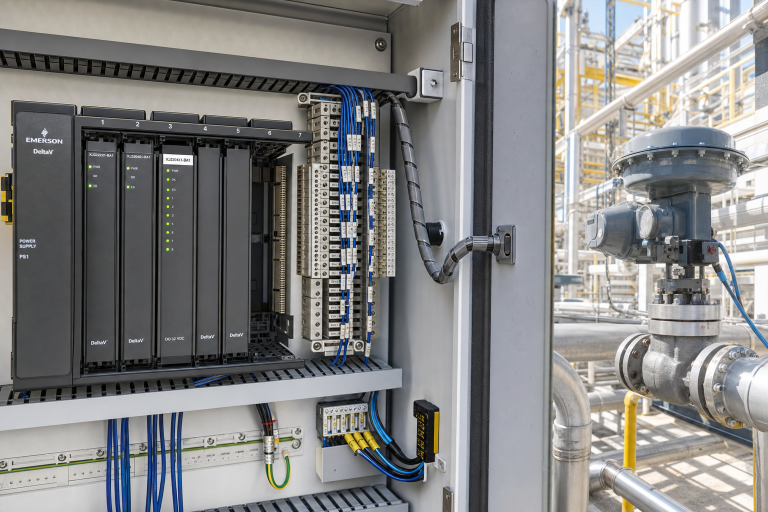
ZYPLC lists the Emerson KJ3203X1-BA1 DeltaV S-series analog input module. Use the listing to identify an item for review, not as a guarantee that it is compatible with every carrier, node or system revision. Compare the complete suffix and hardware generation with the installed parts list and manufacturer documents. Confirm whether the suspected issue is actually the input module before raising a replacement request. For a distinct output-side fault, the site’s DeltaV digital-output troubleshooting note covers a complementary but electrically different boundary.
Check grounding, shielding and shared disturbances
Intermittent noise can follow poor shield practices, electrical interference, loose commons, a failing transmitter supply or routing near switching loads. Compare the signal under normal operating conditions and correlate noise with motor starts, drive operation, instrument maintenance and moisture events. Follow the plant grounding standard; do not add an ad hoc ground connection because the trend looks noisy. Document shield termination at both ends as found and compare it with the approved wiring design.
If many unrelated channels changed at once, look for a shared supply, grounding, cabinet temperature, communication or time synchronization event. A single module replacement is unlikely to explain a wide pattern unless the architecture points to a common dependency. Keep channel-specific and system-wide evidence separate, and use a timeline to distinguish the original process change from secondary alarms triggered afterward.
Prepare the spare decision and acceptance test
For an RFQ, provide the exact module and termination labels, revision, node and slot, channel configuration, transmitter type, loop drawing, fault text, measured values and requested condition. State whether the need is planned or outage-critical and ask what inspection and test information is available. The site engineering team must confirm compatibility, carrier support, firmware, configuration and process-loop suitability against approved documents. Do not change controller configuration solely to accommodate a part that has not been approved.
Before work, define the process condition, bypass or alarm handling, temporary instrument use, rollback approach and acceptance evidence. After any authorized repair, verify channel quality, expected current-to-engineering-unit scaling, alarm behavior and downstream logic according to the approved test. Restore shields, terminal covers and loop connections, remove temporary test equipment, and have operations confirm that the displayed value is plausible against independent process evidence. Record as-found and as-left readings with the work order.
Questions maintenance teams ask
Does an underrange alarm prove the analog input card is bad?
No. It can result from the transmitter, loop supply, open wiring, termination, configuration or the card. Measure at approved points and compare channel diagnostics before deciding.
Can I inject a calibrator signal while the process is running?
Only under a documented, authorized test method that addresses process effects and the loop’s safety role. Never open or drive a live loop as an informal diagnostic.
Why does the cabinet measurement look right while the operator value is wrong?
Check input type, range, scaling, filtering, bad-quality handling and the logic path to the display. Preserve both raw channel data and application configuration.
What should accompany a DeltaV analog input spare request?
Include exact suffix and revision, carrier and node, channel, termination identity, loop drawing, measured evidence, fault chronology and required condition.
For a DeltaV analog-input inquiry, send ZYPLC the complete module label, node and channel, loop and termination details, diagnostic text, measured evidence and outage window. We can help check catalog identity and available sourcing documentation for your controls review.
© 2026 ZYPLC. All rights reserved. Official Website: https://zyplc.com Inquiry: sales@zyplc.com | WhatsApp/Tel: +86 18359293191
Continue reading