
ZYPLC Blog
Remote Antenna Field Kits: Lead-Time Lessons from the iDirect Advisory
The July 2, 2026 iDirect iQ-Series advisory is a useful reminder that remote communication repairs are often lead-time problems before they are technical problems. A satellite terminal, antenna feed, power supply, or surge device may be small compared with a PLC rack, but a missing part can leave a remote site blind. ZYPLC buyers are […]
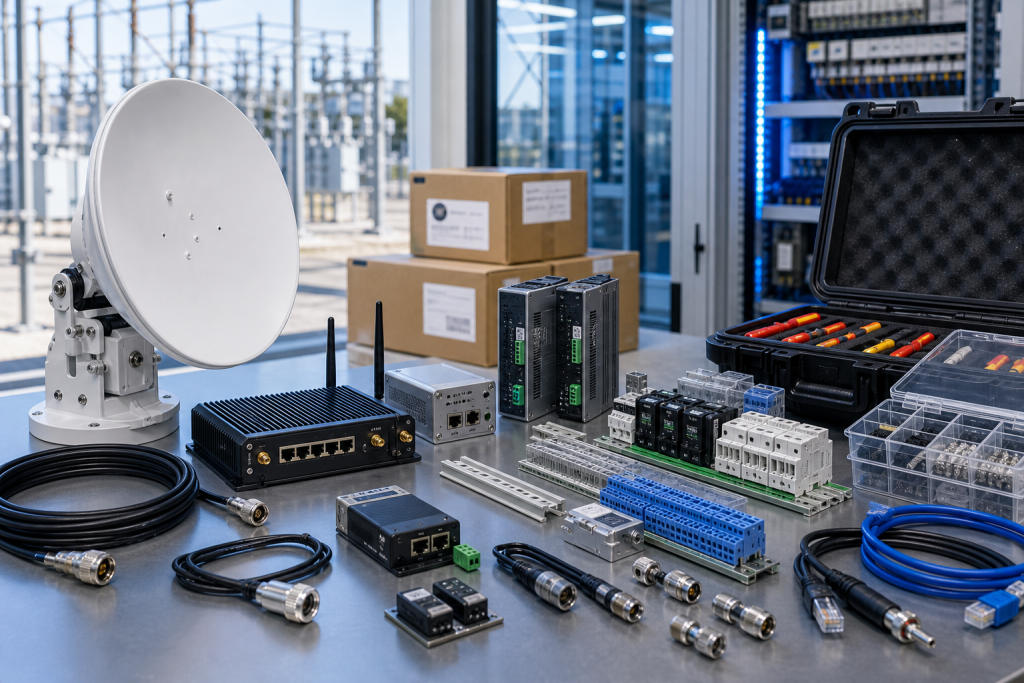
The July 2, 2026 iDirect iQ-Series advisory is a useful reminder that remote communication repairs are often lead-time problems before they are technical problems. A satellite terminal, antenna feed, power supply, or surge device may be small compared with a PLC rack, but a missing part can leave a remote site blind.
ZYPLC buyers are usually measured by whether the right kit arrives before the maintenance window. Remote communication kits need more than one part number. They need the antenna accessories, cables, connectors, power items, mounting hardware, and configuration owner that make the device usable in the field.
Rank remote kits by site consequence
Start with consequence and access. Which sites depend on satellite or specialized wireless communication for alarms, telemetry, dispatch, or engineering support? Which sites require long travel or difficult permits? Those locations deserve earlier lead-time action.
A lead-time table should include terminal model, antenna type, cable length, connector style, power supply, surge protection, mounting kit, spare quantity, acceptable condition, and approved substitute status. Keep this with Lead Time & Supply records.
The most expensive spare is often the small item discovered late. A terminal may ship quickly while a special cable, bracket, or protection device holds the job. Build kits around installed photos, not catalog memory.
Compare device-only and field-ready offers
Device-only quotes may be fine for planned shelf stock. Field-ready recovery needs accessories, packing, and a clear dispatch plan. Ask suppliers to state exactly what is included and what remains to be sourced locally.
For remote sites, partial shipment should be judged against the field task. Receiving the main device early does not help if the missing part is required for installation. Buyers should compare shipment plans against the actual cabinet and antenna setup.
Condition levels should be practical. New surplus may be preferred for strategic stock, while tested used hardware may be acceptable for urgent recovery if engineering approves the risk.
Keep the kit complete after delivery
Field kits drift. Cables get borrowed, power supplies move, and cartons are opened. Use a photo log or checklist so the highest-risk kits remain complete.
After a site visit, update the kit record with what was actually used. If a connector or surge item saved the job, it belongs in the standard kit. If a substitute required extra work, mark it conditional.
The goal is not to overstock every site. It is to know which communication paths deserve staged spares before an advisory, outage, or weather event forces the issue.
Procurement and receiving checks
The RFQ should separate replacement sourcing after RFQ confirmation, planned stock, and test-bench use. Those needs may point to different condition levels, accessories, and dispatch priorities. Emergency recovery needs exact evidence and realistic shipment timing. Planned stock can allow time for substitute review. Test-bench hardware can sometimes accept a narrower configuration, as long as it is labeled clearly and never confused with an approved production spare.
Ask suppliers for actual photos, accessory scope, condition language, warranty terms, and the expected dispatch path. Device-only quotes should be compared against complete-kit quotes with care. A lower price can become expensive if a missing cable, antenna, power supply, terminal plug, storage device, or mounting part forces a second shipment during a maintenance window.
Receiving inspection should mirror the RFQ. Compare labels, ports, accessory count, visible condition, packaging, and included documents before the item enters stock. If firmware, software, or backup status remains unknown, mark it unknown. Known uncertainty is much safer than quiet assumption, especially when a different buyer or technician may pull the spare months later.
Keep the evidence useful after the order
The work should not stop when the purchase order is placed. Save the original RFQ photos, supplier photos, accepted quote, receiving photos, and engineering notes together. That file becomes the next buyer’s starting point. It also protects the maintenance team when the same device family appears in a later advisory, outage, or migration review.
For critical spares, add a short status label: exact match, possible substitute, repair option, test bench only, or not approved for production. This prevents a conditional item from being pulled as if it were already accepted. It also helps stores staff understand why two similar-looking devices may not be interchangeable.
Finally, review the record after the next maintenance window. If a cable, power item, software file, antenna accessory, or configuration owner became the bottleneck, add that lesson to the standard kit. Spare planning improves when the purchase history and the field repair history are allowed to meet.
Risk grading keeps the process realistic. Not every edge device deserves the same shelf depth. Rank by production consequence, travel time, lead time, substitute confidence, configuration complexity, and who can approve the restore. This gives procurement a defensible reason to prioritize one spare kit over another.
A short quarterly review is enough for many sites. Pull the highest-risk records, confirm the spare still exists, check whether accessories are still boxed with it, and verify that the named technical owner is still current. This small habit catches quiet drift before it turns into downtime.
FAQ
What belongs in a remote antenna field kit?
Include terminal hardware, antenna accessories, coax, Ethernet, power supply, surge protection, mounting parts, grounding items, and safe recovery notes.
Should every remote site have a local kit?
Not always. Decide by consequence, travel time, local skill, lead time, and whether central stock can meet the recovery target.
How should lead time be checked?
Check the whole kit, not only the main terminal. Cables, connectors, brackets, and power items can become the bottleneck.
How do I request a quote?
Send installed photos, exact model, accessory needs, condition, destination, and deadline through a structured RFQ.
Send ZYPLC your remote communication photos, accessory list, site priority, and target window. We can help turn a single-device request into a field-ready spare plan.
© 2026 ZYPLC. All rights reserved. Official Website: https://zyplc.com Inquiry: plc.sales@zyplc.com | WhatsApp/Tel: +86 19859288691
Continue reading
Related sourcing guides
 Jun 21, 2026
How To Prioritize Network Module Spares When A Fix Is Not Planned
A ZYPLC sourcing guide for ranking PLC Ethernet modules, gateway spares, and communication cards when advisories offer no simple firmware path.
 Jun 14, 2026
How To Triage A Mixed Automation Spare List By Lead Time
A ZYPLC guide for ranking PLC, DCS, HMI, drives, robotics, and sensor spares by downtime risk and sourcing difficulty.